Project database (SQL Server)
Writing alarm, event, recipe, report and archive records also to an SQL Server database belonging to the project: Live settings › Database, the SQL Server Express supplied with the installation, Windows account permission, tables, reading, daily backup, retention and redundant server.
What it is used for
By default Live writes its records to files in the .veri folder next to the project file (Files and folders of Live). If SQL Server database is selected in Live settings › General › Database, the same records are also written to an SQL Server database belonging to the project. Excel, reporting tools or an MES can read these records with SQL.
- Records written to the database: alarm history, event log (including operator actions), recipe transfers, recipe records, report records, data logs and Live's persistent records (e.g. persistent tag values).
- Not sent: data that belongs to this computer (station settings, connection passwords), time machine recordings and program logs.
- The local file is always written and remains as a backup copy: if the database connection is lost, no record is lost; it waits in the local file and is sent when the connection is restored.
SQL Server and Windows account
The default server is .\FABYAVISION: the optional Database server (Microsoft SQL Server 2025 Express) component of the setup program installs this instance on the Live computer (Installation › Database server). An existing SQL Server can also be used.
- The instance installed by the setup is closed to the network (TCP/IP and named pipes disabled): connections are possible only from the same computer.
- SQL Server 2025 Express requires 64-bit Windows 10 / 11 or Windows Server 2019 or later. On Windows 7 this component is not installed; Live continues to write its records to the local file.
Settings
- Select where the records are stored
Live settings › General › Database › Record storage: SQL Server database. While Local file is selected (default), no database is used.
- Enter the server
If Server is empty,
.\FABYAVISIONis used. For another server, enterBILGISAYAR\ORNEKorBILGISAYAR,port. - Specify the database name
If Database name is empty,
FV_+ the project name is used: Turkish letters are converted to letters of the English alphabet, and all characters other than letters and digits become_(e.g.FV_Demo_Projesi). The name must start with a letter or_and may contain only letters of the English alphabet, digits and_(at most 100 characters). An invalid name causes an error at F7; in that case Live writes the records only to the local file. - Select the authentication
If SQL user is empty, Windows authentication is used (recommended). If it is filled in, the SQL password field appears: press Set… and type the password twice in the password window (at least 6 characters). If the SQL Server password is shorter, it cannot be entered in Studio; set a longer password on SQL Server. The password is stored obfuscated in the project file (this is not encryption) and is not sent to remote monitoring devices. If the password is empty, F7 issues a warning.
- Test the connection
Test connection connects to the server from the Studio computer; it checks whether the database and the tables exist and, if not, whether there is permission to create them. It writes and creates nothing.
- Upload the project to Live
When Live opens the project, it creates the database if it does not exist (recovery model SIMPLE), creates the tables and sends the records from the local files.
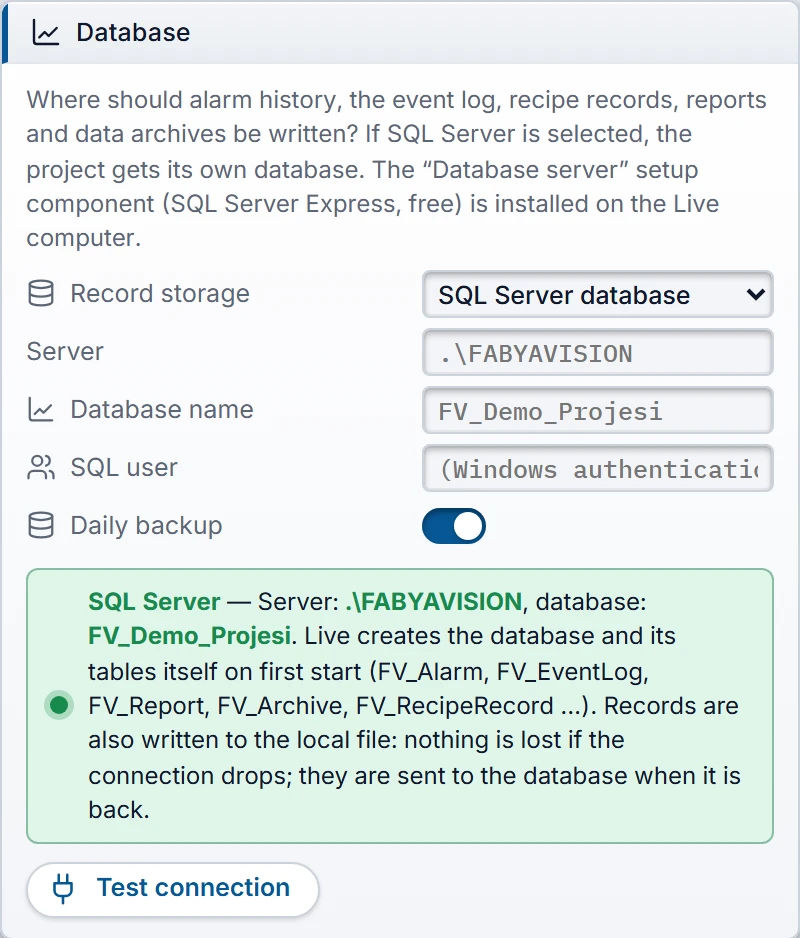 12345
- Record storage — Local file or SQL Server database.
- Server — if empty:
.\FABYAVISION. - Database name — empty:
FV_+ project name. - Daily backup — 7 files, one per day of the week.
- Test connection — tests from the Studio PC and writes nothing.
| Test connection message | Meaning |
|---|---|
| Database "…" exists; FabyaVision tables: N. | Ready. |
| Database "…" does not exist: Live creates it on first start (this account has CREATE DATABASE permission). | Ready; Live creates it. |
| … does not exist and this account has no CREATE DATABASE permission … | Create the database manually or grant the permission. |
| Could not connect (…). .\FABYAVISION may not be installed on this computer … | The server does not exist on this computer or is not running. |
How it works in Live
- Sending: Live first writes every record to the local file. In the background it reads the new rows and writes them to the tables in batches;
<Proje>.veri\vt\durum.jsonkeeps track of where it left off. The same row is never written twice; resending is safe. - Reading: Live reads records (alarm history, event view, report records, archive and trend history) from the database while the database is connected and all rows of that log have been sent; otherwise from the local file. Both ways give the same result.
- First connection: local persistent records are added if they do not exist in the database; the value in the database is not overwritten.
- If the connection is lost: Live retries (starting at 5 seconds, at intervals of up to 60 seconds); the records wait in the local file. A
sistementry is written to the event log: Cannot write to the database (…); records are kept in the local file and will be sent when the connection is back. and, when the connection returns, Database connection restored; pending records are being sent. - If the database changes: if the database is deleted and created again, or another database is selected, the local records are sent again from the beginning.
- Program log: the lines
Veritabani: <sunucu> / <ad> (…),Veritabani baglandi …,Veritabani olusturuldu …,Veritabani yedegi alindi …are written (Log files).
Tables
The tables are in the dbo schema. Time columns come in two formats: UnixMs (UTC, milliseconds) and [Time] (local time of the Live computer). The names of the tag, archive, recipe and report IDs are in the FV_Name table; the views supply the names directly.
| Table / view | Content |
|---|---|
FV_Alarm | Alarm events: time, alarm number, event (incoming, outgoing, acknowledged, shelved, unshelved, comment), class, text, location, user, value, comment. |
FV_EventLog | Event log: type, user, message (including operator actions). |
FV_RecipeTransfer | Recipe transfers: recipe, record, user, result, message, duration. |
FV_Report, FV_ReportValue | Report records (record no., user, source, note; approval and deletion rows) and the field values of the record. |
FV_Archive | Data log values: log, tag, time, numeric value, text, quality. |
FV_RecipeRecord, FV_RecipeValue | Recipe records (state, created by, changed by, approved by) and element values. Built from FV_Store; for reading only. |
FV_Store | Live's persistent records (JSON): recipe records, persistent tag values and the like. |
FV_Log | Other logs. |
FV_Name | ID → name: tag, log, recipe, report, recipe element, report field. Refreshed each time the project is opened. |
FV_Info | Database ID, schema version, date and file of the last backup. |
FV_AlarmView, FV_ArchiveView, FV_ReportView | Views that make reading easier: alarm event names (Came, Went, Acknowledged, Shelved, Unshelved, Comment), log and tag names, report name. Created on SQL Server 2016 SP1 and later. |
Backup and retention
- Daily backup (Daily backup, on by default): every day, at the first opportunity after 01:00, Live makes a full backup of the database. The file name is
<veritabanı>_<1–7>.bak(1 = Monday … 7 = Sunday) and it is written to the default backup folder of SQL Server; a week later, the file of the same day is overwritten. The day and file of the last backup are inFV_Info. If the backup fails, Database backup failed (…). is written to the event log. - The backup files are on the computer where SQL Server is located. To protect against disk failure, plan separately to copy the files to another location.
- Retention: the database has no separate retention setting. When the report and archive maintenance deletes an old monthly local file, the rows of the same month in the database are also deleted (Data archives). Live does not delete alarm, event and recipe transfer records.
- SQL Server Express has a size limit per database (see Microsoft's edition terms). Monitor the size for large and long-term archives.
Redundant server and remote monitoring
- Redundant server pair: if the server name is local, such as
.\FABYAVISION, each Live writes to the database on its own computer: there are two separate, complete copies. For a shared database, enter the computer name in the server name (e.g.PC-A\FABYAVISION); even if both Live instances write the same record, the row is kept only once. The Studio card states which case applies (Server redundancy). - Monitoring from a browser: the database setting (server, user, password) is not sent to browsers; the browser reads the records through Live.
Limits
- The trial setup has no Database server component. Live can connect to an existing SQL Server (Trial version).
- There is no separate window in Live that shows the database state; the state is monitored in the event log and the program log.
- The separate SQL Server mirroring option of a data log (Data archives) is independent of this and writes to its own table.