OPC UA server
Live exposes the tags you select to the outside as an OPC UA server: an MES, another SCADA or a data acquisition program reads these tags, subscribes to them and, if you have allowed it, writes to them. License, Studio settings, tag selection, address space, write rules, quality codes and logging.
The server runs inside the Live program. An external OPC UA client connects to Live and sees only the tags that you have given access to. The steps for connecting the client on the Live side are in the Connecting a client to the OPC UA server topic.
| OPC UA driver | OPC UA server | |
|---|---|---|
| The role of Live | Client: connects to another server. | Server: external clients connect to Live. |
| What it is for | Bringing values from a PLC or gateway into Live. | Providing tag values to external systems. |
| Where it is set | Connections (OPC UA driver). | The OPC UA Server section and the OPC UA access column. |
License and trial version
The server is off by default in the project. When turned on, it behaves as follows, depending on the license:
| State | Behavior |
|---|---|
Full version, with a FV-OPC-P (perpetual) or FV-OPC-A (annual) license | The server starts. |
| Full version, without this license | Live runs, but the server does not start. The OPC UA server… button in the system menu still appears; the window shows the reason. The same message also goes to the event log and the program log. |
| Trial version | No license is required. There is no server-specific limit. Each run lasts 1 hour: when the session ends and Live closes, the server closes too (Trial version). |
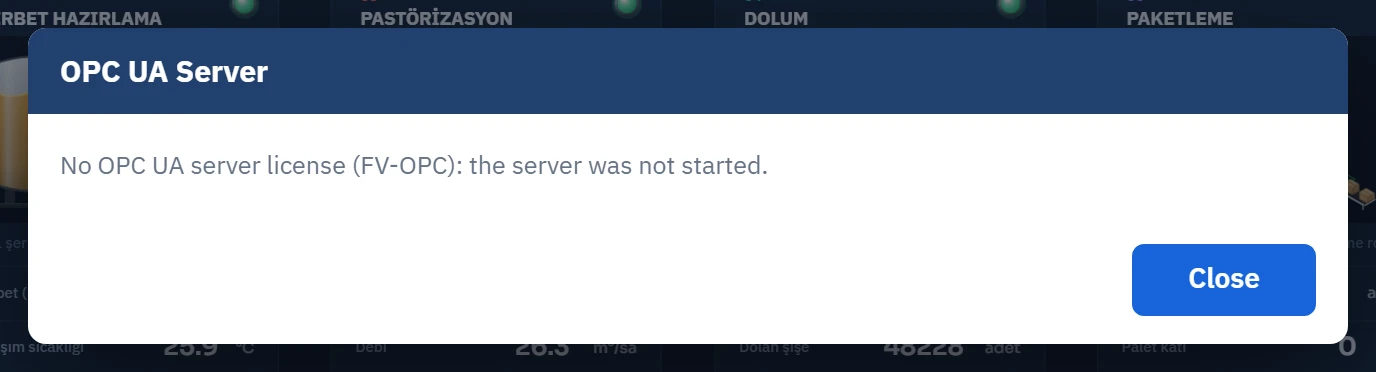
Loading license files is described in License and activation.
Turning on the server
- Open the section
In the project tree, click the OPC UA Server section.
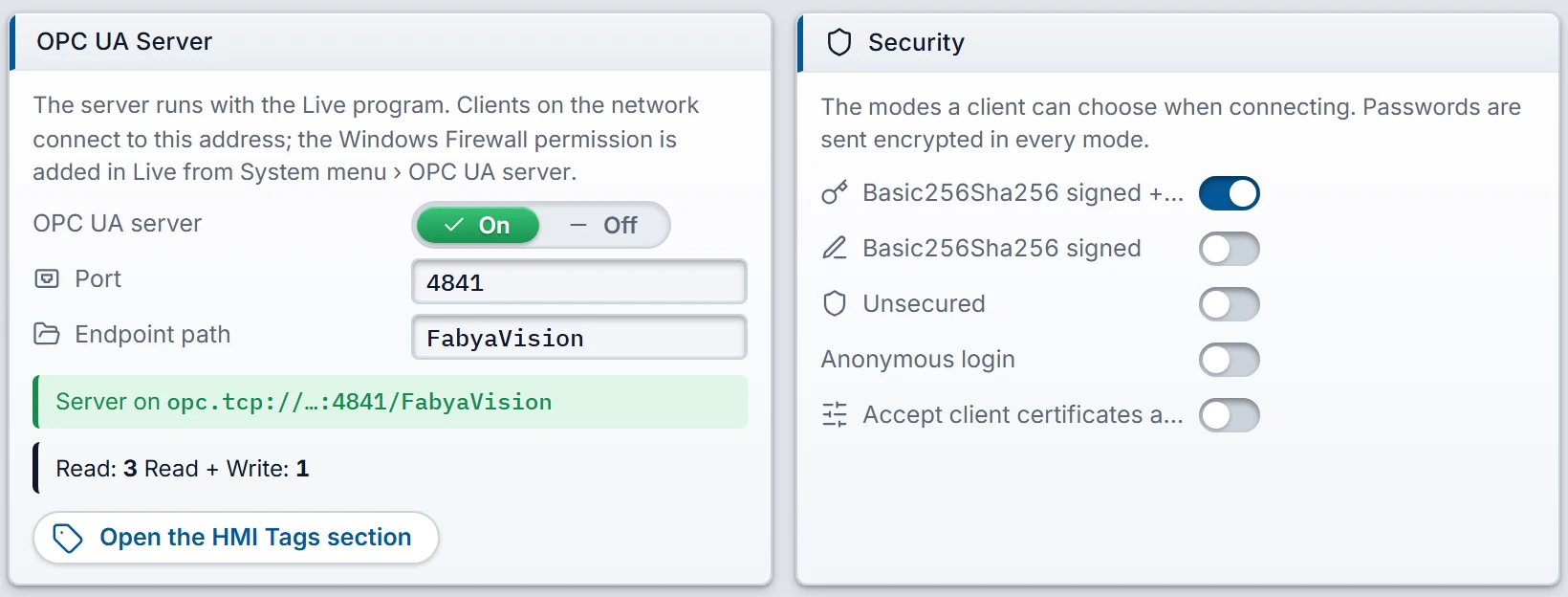 1234567
OPC UA Server section, General tab: server, address, summary and security settings. - OPC UA server — On / Off. Default Off.
- Port — default 4841.
- Endpoint path — the part of the address after the port.
- Summary — state, address and the number of tags with access.
- Security modes — the endpoints the client can select.
- Anonymous login — an anonymous client can only read.
- Certificate acceptance — while it is off, a new client waits for approval in Live.
- Turn on the server
On the General tab, set the OPC UA server switch to On.
- Check the address
Change the Port and Endpoint path defaults if necessary.
- Select the security modes
By default, only the signed + encrypted mode is on. Select the modes according to the Security section.
- Add a user
Define one user per client on the Users tab (Users).
- Give access to the tags
Fill in the HMI tags column of the OPC UA access table (Tag selection).
- Fix the warnings
The Info tab of the Inspector lists what is missing: it warns if no tag has been given access, if no user has a password, or if there are tags with write access but no user with write permission. If the port is invalid or is the same as the browser monitoring port, it reports an error.
- Upload the project to Live
A running Live does not pick up the new version by itself (Uploading the project to Live). Live starts the server when it opens the project. Because the server certificate is generated at the first start, starting can take a few seconds.
- Check the state
In Live, open the OPC UA server… window from the system menu and confirm that it shows Running (Connecting a client to the OPC UA server).
General settings
| Field | Meaning |
|---|---|
| OPC UA server | Default Off. While it is off, Live does not open the OPC UA port. |
| Port | Default 4841. Integer, 1 – 65535. Change the port if another program on the computer is using it. |
| Endpoint path | Default FabyaVision. The part of the address after the port. Contains only letters, digits and . _ - /. |
The address has this format: opc.tcp://<bilgisayar>:<port>/<yol>. Example with the default settings: opc.tcp://192.168.0.10:4841/FabyaVision.
Security
| Field | Default | Meaning |
|---|---|---|
| Basic256Sha256 signed + encrypted | On | Recommended mode. Traffic is signed and encrypted. |
| Basic256Sha256 signed | Off | Traffic is signed, not encrypted. |
| Unsecured | Off | Tag values travel unencrypted on the network. Only on a closed network and for testing. |
| Anonymous login | Off | Clients connect without a user name. Anyone on the network can read the exposed tags. An anonymous client cannot write. |
| Accept client certificates automatically | Off | When off, a new client is rejected and waits for approval in Live. When on, unknown clients can also connect. |
- If no mode is selected, Live opens only the signed + encrypted mode.
- Logon with a user name is always offered. If no user is defined and anonymous login is off, no client can connect.
- The user password is sent encrypted in every mode. On the Unsecured endpoint too, the password is encrypted with the server certificate; values and write commands, however, remain unencrypted.
Users
These users are only for the logon of OPC UA clients. They are separate from Live and browser users.
 123
- Name — the user name the client enters.
- Password — at least 6 characters; its hash is stored and it is not displayed.
- Write permission — while it is off, the user can only read.
| Column | Rule |
|---|---|
| Name | Required and unique, at most 40 characters. Logon is case-sensitive. |
| Password | At least 6 characters. Double-click the cell or press Enter / F2, then type it twice in the password window. Shorter passwords entered earlier keep working. A user without a password cannot log on. |
| Write permission | Off by default. While it is off, the user can only read. While it is on, the user can write to all tags set to Read + Write. |
| Note | Free text. |
Tag selection: OPC UA access column
The HMI tags column in the OPC UA access table determines whether each tag is exposed.
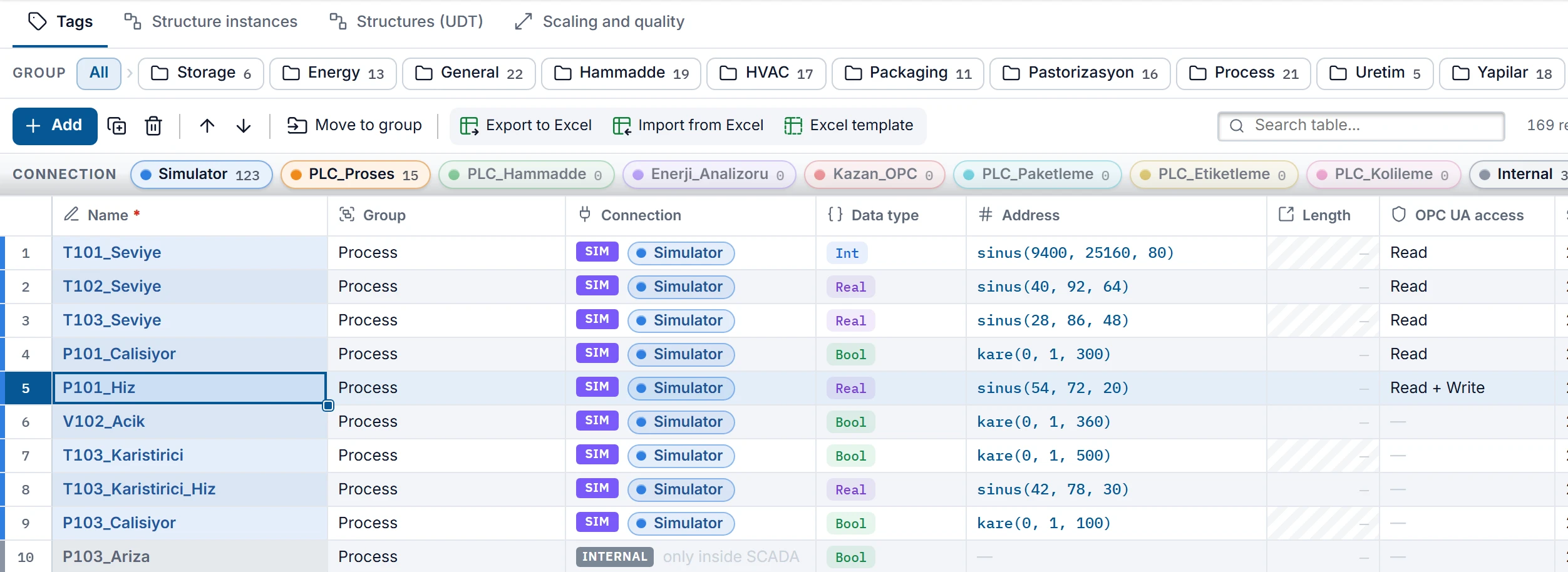 1
- OPC UA access — Off (a dash in the cell), Read or Read + Write.
| Option | In the table | Meaning |
|---|---|---|
| Off | — | The default for a new tag. The tag does not enter the address space and the client does not see it. |
| Read | Read | The client can read and subscribe, but not write. |
| Read + Write | Read + Write | A user with write authorization can write. An unauthorized user and an anonymous client can only read. |
- The column affects only OPC UA clients. It does not change writing by operators and scripts.
- For Per screen tags the column is locked; these tags are not exposed.
- The column is also included in the Export to Excel output (Transferring tags with Excel).
Address space
The client sees the nodes in the FabyaVision folder under Objects. Tag groups and structure instances become folders:
Objects
└─ FabyaVision
   ├─ Proses                  (tag grubu)
   │  ├─ T101_Seviye          ns=2;s=T101_Seviye
   │  └─ P101_Hiz             ns=2;s=P101_Hiz
   └─ Yapilar                 (tag grubu)
      └─ Pompa_P101           (yapı örneği)
└─ Hiz ns=2;s=Pompa_P101.Hiz- Node ID
ns=2;s=<tag adı>. The identifier is the full name of the tag in Studio. Folders are not part of the identifier; for a structure member, the full name contains a dot (Pompa_P101.Hiz).- Namespace
urn:fabyavision:live:tags. If your client supports it, enter the address instead of the number:nsu=urn:fabyavision:live:tags;s=T101_Seviye.- Display name
- The last part of the tag name (
Hiz). A tag without a group is directly underFabyaVision. - Description
- The Description text of the tag; if there is a unit, it is added at the end in square brackets (
[%]).
Data types
| Tag type | OPC UA type |
|---|---|
Bool | Boolean |
Byte / SInt | Byte / SByte |
Int / UInt | Int16 / UInt16 |
DInt / UDInt | Int32 / UInt32 |
Real / LReal | Float / Double |
String, WString | String |
DateTime | DateTime |
A tag with scaling on is exposed as Double, whatever its type: the client sees and writes the engineering value (Scaling and quality).
Live sends changed values to the server at most once every 200 ms. The value of a tag is not refreshed faster than the Acquisition cycle of the tag. The timestamp is the moment the value was written to the server, not the PLC clock.
How a write is processed
A client write is checked in the order below. A failed check stops the write and a status code is returned to the client.
| Order | Check | If it fails |
|---|---|---|
| 1 | Is the tag set to Read + Write? | BadNotWritable |
| 2 | Does the user have Write permission? An anonymous client does not. | BadUserAccessDenied |
| 3 | Does the write cover the whole value? Array ranges are not accepted. | BadIndexRangeInvalid |
| 4 | Does the value match the type? Only Boolean can be written to a Bool tag, only String to a text tag, only DateTime to a DateTime tag, and only a number to a numeric tag. | BadTypeMismatch |
| 5 | Is the number between Lower limit and Upper limit? | BadOutOfRange |
| 6 | Did Live apply the write? | BadTimeout if there is no response within 5 s. BadDeviceFailure and a reason text if Live rejects the write or the driver cannot write. |
- A write goes through the normal write path of Live: for a scaled tag, the value is converted to the raw value, and a PLC tag goes to the driver. In a redundant pair, a write arriving at the standby server is forwarded to the master.
- The authorization of the user logged on in Live is not checked. The right to write is determined only by the Write permission of the OPC UA user.
- The connection status tag cannot be written; the client receives
BadDeviceFailure.
Quality codes
| Code | When |
|---|---|
Good | The value is valid. |
BadWaitingForInitialData | No value has arrived for the tag yet: the server has just started or the tag could not be read at all. |
BadNoCommunication | The connection of the PLC tag is lost. If no publication arrives from Live for 15 s, all tags get this code; when publication resumes, all tags are refreshed. |
BadConfigurationError | The tag received an error (e.g. invalid address). Only that tag is affected. |
BadTypeMismatch | The value could not be converted to the data type of the node (e.g. a number that does not fit the Byte type, a corrupt date). |
- When the connection is lost, the last value stays in the node. The client must evaluate the value together with its quality.
- Internal and simulator tags are not affected by the connection state.
What is logged
| Event | Where it is written |
|---|---|
| Successful client write | Event log, type sistem: OPC UA yazma: P101_Hiz = 55 (hat_yazma). At most one row per 10 s is written for the same tag; writes in between do not produce a row. |
| No license | Event log and program log. |
| Server could not be started | Program log. The reason is also shown in the Live window. |
| Firewall permission added | Program log. |
Clients connecting or disconnecting, rejected logons, rejected writes and read operations are not logged. To see the currently connected clients, use the Live window. Log files: Log files.