Notification channels: e-mail and SMS
Sets the route that e-mail and SMS will take: SMTP server, SMS provider, HTTP patterns, where passwords are stored, retrying and test sending.
Choosing the route
Each channel has two routes. Make the selection on the Notifications›General tab. In a new project, both are on the modem route. If the SCADA computer is closed to the internet, use the modem route.
| Channel | Path | What is required |
|---|---|---|
| GSM / LTE modem (SIM card) | Modem with a SIM card, data link, APN and an SMTP server reachable from the internet. The computer does not need internet access. | |
| Computer's network connection | Access from the Live computer to the SMTP server: internet, an in-plant mail server or a cellular router acting as a gateway. | |
| SMS | GSM / LTE modem (SIM card) | Modem with a SIM card. No internet or data link is required. |
| HTTP API (provider or router) | Access to an SMS provider on the internet, or a cellular router with an SMS endpoint on the local network. |
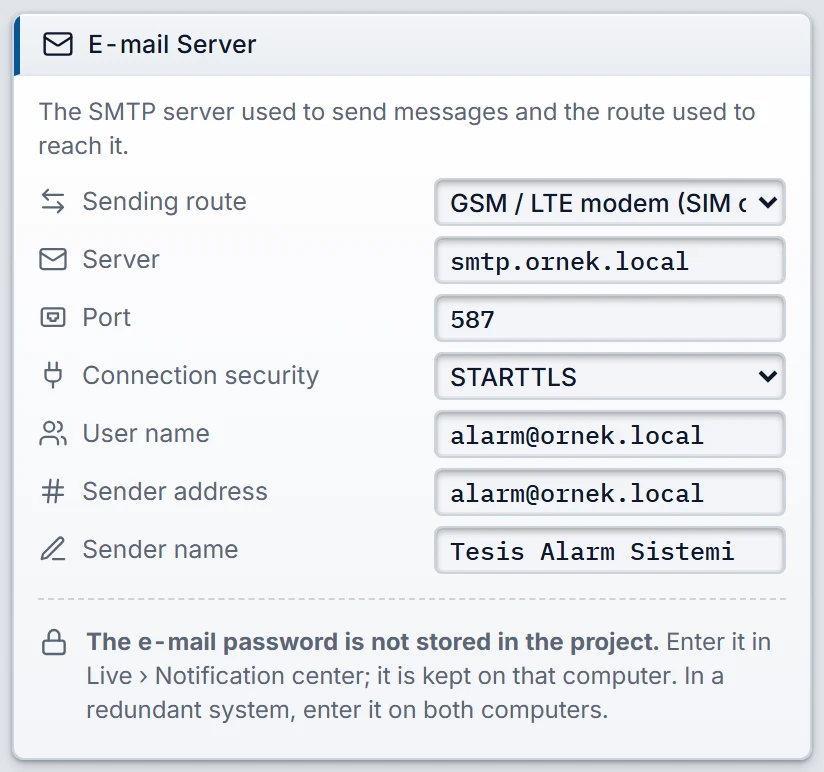
- Sending route
- Modem or the computer's network.
- Server
- Name or IP address of the SMTP server, e.g.
smtp.ornek.local. - Port
- Default 587. STARTTLS mostly uses 587, direct TLS uses 465.
- Connection security
- STARTTLS, TLS (direct) or No encryption. With STARTTLS selected, if the server does not offer it, the message is not sent unencrypted and the error The e-mail server does not offer STARTTLS: check the security setting. appears.
- User name
- The account that logs on to the server. If empty, no logon is performed. Its password is entered in Live.
- Sender address
- Who the message is sent from. If empty, the user name is used. If both are empty, the e-mail is not sent.
- Sender name
- The name shown in the inbox, e.g.
Tesis Alarm Sistemi.
SMS: modem route
When SMS route is GSM / LTE modem (SIM card), only Country code remains on the card. The port and speed come from the GSM / LTE Modem card: Notifications over a GSM / LTE modem.
- The message is always sent as Unicode (UCS-2). A single SMS has 70 characters, a multipart SMS 67 characters per part. This applies even if the text has no Turkish letters.
- The meter on the template screen shows these limits on the modem route: 70 / 67.
- The validity period of the message is 24 hours. The message center number is taken from the SIM card.
SMS: HTTP API route
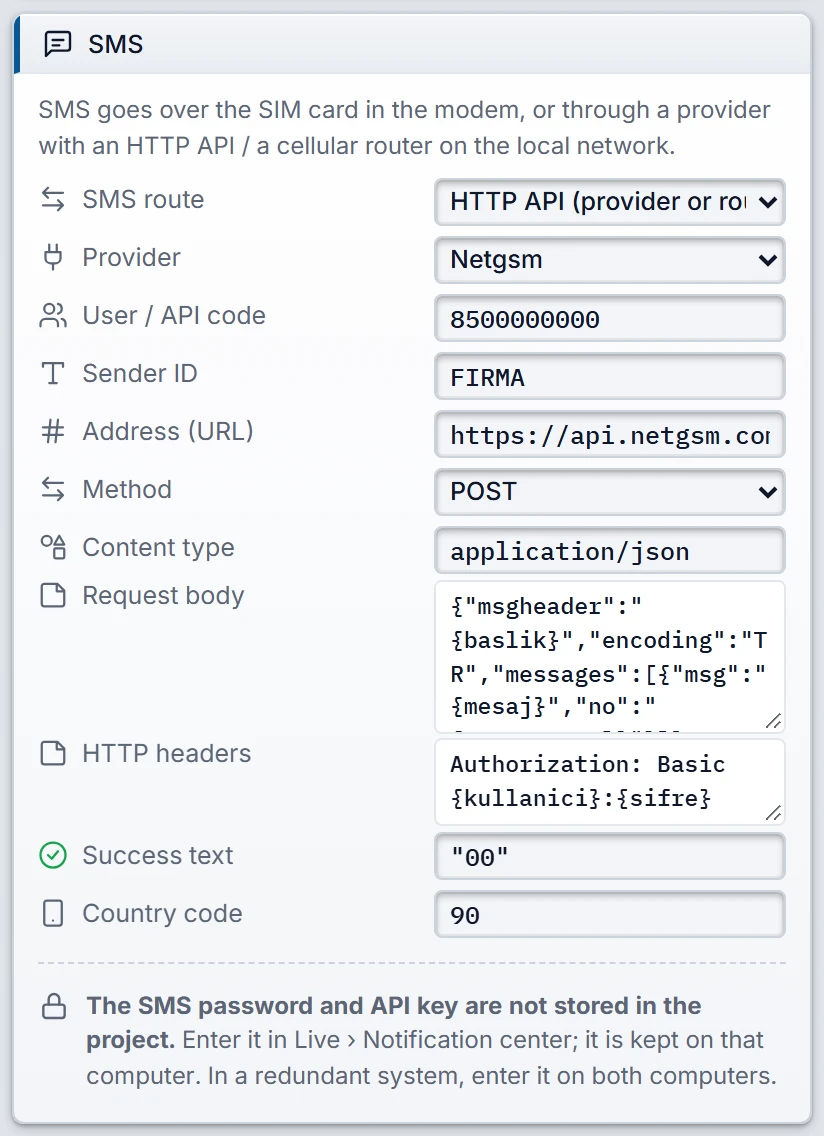
On this route Live sends an HTTP request to the SMS provider or to a router on the local network. When you make a selection in the Provider list, the address, body, headers and success text are filled in with that provider's pattern. You can then change these fields.
 123
- Provider — when selected, the address, body, headers and success text are filled in.
- Request body — placeholders are filled in at sending.
- Success text — if it appears in the response, the message counts as sent.
| Provider | User / API code | Sender ID | The key entered in Live |
|---|---|---|---|
| Netgsm | Subscriber number (user code) | Sender ID approved by the provider | Password issued by the provider |
| İleti Merkezi | API key (key) | Sender ID approved by the provider | API hash value |
| Twilio | Account SID | Sender number (+1...) | Auth Token |
| Teltonika router (local network) | SMS endpoint user name | Not used | SMS endpoint password |
| Custom | There is no pattern. Fill in the fields according to your provider's documentation. | ||
In the router template, replace 192.168.1.1 in the address with the IP address of your router. The Post/Get feature of the SMS gateway must be enabled on the router. This template sends the password in the address, so use it only on a local network that you trust.
Request fields
- Address (URL)
- Starts with
http://orhttps://. Redirects are not followed: a 3xx response counts as a failure. - Method
- POST or GET. With GET no body is sent; the information is written to the address.
- Content type
- E.g.
application/json. If empty, it is determined from the start of the body. - Request body
- The text that the provider expects. Placeholders are filled in when sending.
- HTTP headers
- One header per line:
Ad: değer. The lineAuthorization: Basic {kullanici}:{sifre}is converted to Base64. - Success text
- If this text occurs in the response, the message is considered sent. If empty, HTTP 2xx is sufficient.
- Country code
- 1 – 4 digits, 90 for Türkiye. The forms
0555…,+90 555…,0090 555…and555…are converted to the same number. The result must have 8 – 15 digits.
| Placeholder | Value |
|---|---|
{numara} | Digits with country code, without the + sign: 905550000000 |
{numaraYerel} | Without country code: 5550000000 |
{mesaj} | Message text |
{kullanici} | User / API code |
{baslik} | Sender ID |
{sifre} | The SMS key entered in Live |
The value is escaped according to where it is placed, so JSON, addresses, forms and XML are not broken. If the request does not contain {mesaj} and {numara} or {numaraYerel}, the Problems list reports an error.
Where passwords are stored
Passwords are not written to the project file. Studio has no password field. They are entered in Live in the Credentials section.
| Value | When it is needed |
|---|---|
| E-mail password | If User name is entered. |
| SMS key | If {sifre} appears in the HTTP request. |
| APN password | If the mobile operator requires an APN password. The row appears only if a channel uses the modem. |
| SIM PIN | If the PIN is enabled on the SIM card. The row appears only if a channel uses the modem. |
- The values are stored on the Live computer, in the Windows user's
%LOCALAPPDATA%\FabyaVision\Bildirimfolder, with Windows encryption. They are not displayed again. - If the file is copied to another computer, it cannot be decrypted. If you open Live with another Windows user, enter the values again.
- In a redundant system, it is entered separately on each computer.
- Passwords, keys, PINs and recipient addresses are removed from error texts. In the logs, the recipient appears masked.
Retry
A failed send is repeated after these waiting times: 30 seconds, 1, 2, 5, 15 and 30 minutes. Including the first send, at most 7 attempts are made, which take about 54 minutes in total. If all of them fail, the message becomes Could not be sent and is dropped from the queue.
With some errors retrying is pointless, and the message immediately becomes Could not be sent:
- Invalid e-mail address or phone number, empty SMS text.
- Permanent rejection by the e-mail server (5xx codes).
- Definitive rejection by the provider (HTTP 4xx). Codes 408, 425 and 429 are retried.
- Undefined server, provider address or modem port.
- E-mail password, SMS key or SIM PIN not entered on this computer.
- A number or message error from the modem, a rejected SIM PIN, a modem not supported for e-mail (Notifications over a GSM / LTE modem).
- SMS without a license.
If an SMS permanently cannot be sent and E-mail if SMS fails is on, the same message goes to the contact's e-mail address. This message has its own retry allowance. A key or PIN that was not entered is not retried, so the SMS falls back to e-mail at once.
A password that was entered but that the server does not accept counts as a temporary error, and the message is retried.
The queue is kept on disk: when Live is reopened, the number of attempts and the next attempt time are preserved. E-mail and SMS run in separate lines, so an unreachable e-mail server does not hold up SMS. If both are on the modem route, the single port is used in turn.
Limitations and points to note
- The connection is opened and closed for each message. The timeout is 30 seconds for e-mail, 90 seconds for an SMTP operation over the modem route, and 20 seconds for HTTP SMS.
- If the 2xx response of the provider does not contain the success text, the message is retried. The provider may have received the message; check the success text of the template against the real response.
- Some HTTP headers cannot be set by hand. If such a header is entered, the error SMS header cannot be used appears.