Notifications over a GSM / LTE modem
Sends e-mail and SMS from a SCADA computer that is closed to the internet through a serial modem with a SIM card: COM port, modem family, APN, SIM PIN protection, error messages and what is not supported.
When it is needed
SCADA computers are often closed to the internet. On the modem route, the computer does not need internet access. SMS goes directly from the SIM card. E-mail reaches the SMTP server over the data link of the modem.
The modem is a route shared by the two channels. Its settings are on the GSM / LTE Modem card on the Notifications›General tab. The fields of the card appear only if a channel uses the modem route.
Requirements
- A modem connected to the Live computer via USB or RS-232 that appears as a COM port in Windows.
- An active SIM card. SMS requires an SMS allowance, e-mail requires a data line.
- For e-mail, the APN details of the mobile operator and an SMTP server that can be reached over the data line of the modem. For an in-plant mail server, select Computer's network connection as the route.
Setting up the modem
- Connect the modem
Install the modem driver. In Windows Device Manager, note the name of the port that accepts AT commands, e.g.
COM3. USB modems may open more than one port. - Prepare the SIM card
Try the SIM card in a phone first: verify the PIN and SMS sending. Disabling the PIN on the card is the least risky option.
- Fill in the card
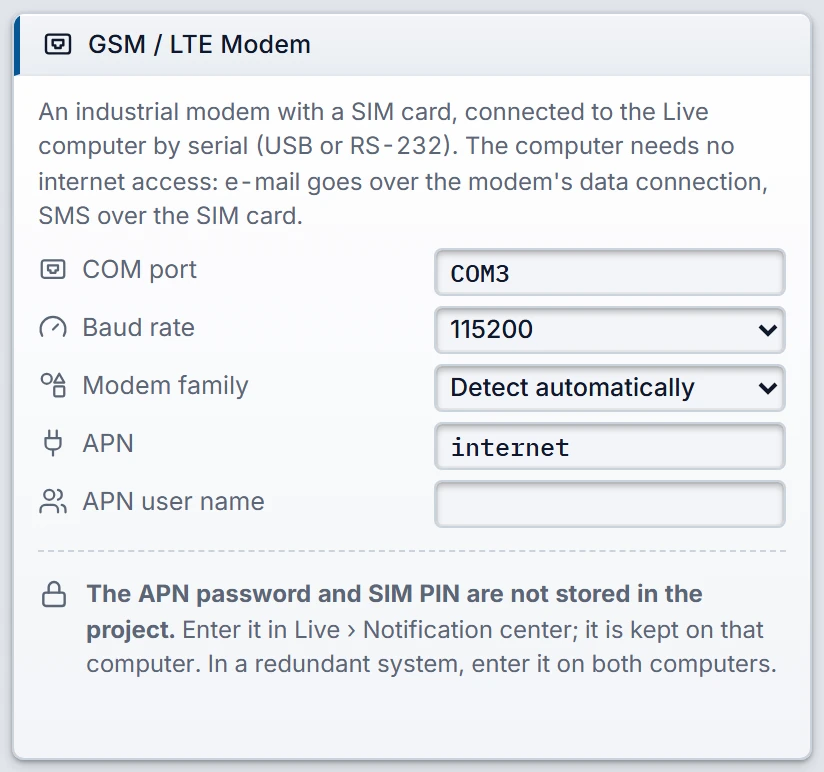
Select E-mail Server as Sending route on the E-mail Server card and as SMS route on the GSM / LTE modem (SIM card) card. Then fill in the modem card.
 1234
The GSM / LTE Modem card. - COM port — the Windows port name of the modem (COM3 format).
- Baud rate — 9600 to 115200.
- Modem family — the data connection command set for e-mail.
- APN — the data access point of the mobile carrier; needed for e-mail only.
- Enter the passwords in Live
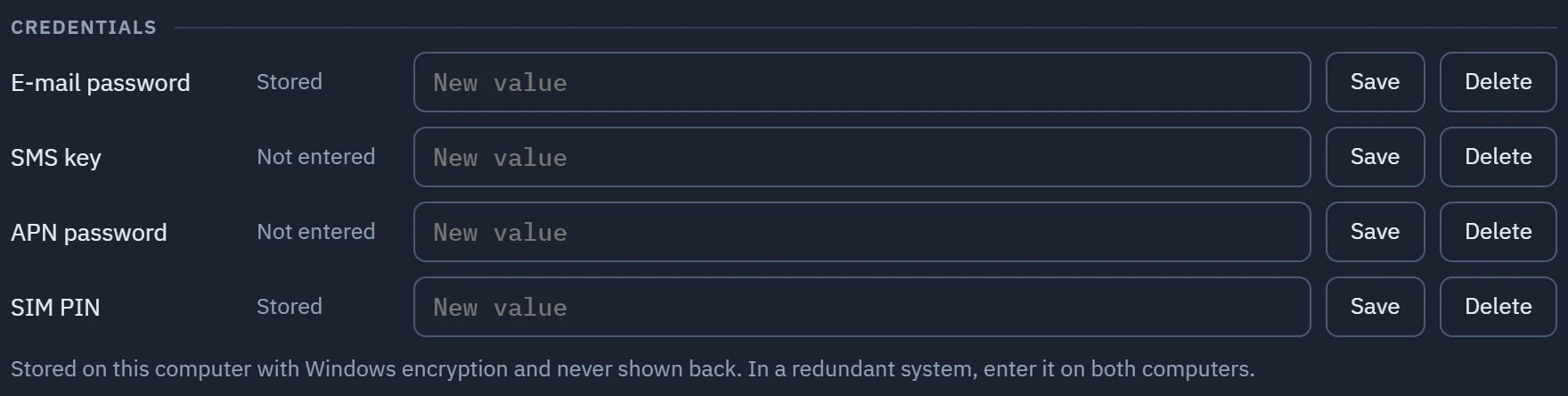
Transfer the project. If required, enter the APN password and SIM PIN in the Notification Center window. These values are not written to the project; they are stored on that computer.
Credentials: the APN and PIN rows appear only if a channel uses the modem. - Send a test
Try SMS first: this verifies the modem, SIM and network. Then try e-mail: this verifies the APN, data link and SMTP.
Card fields
- COM port
- Written in the
COM3format. If empty, the channel on the modem route does not work and the Problems list shows an error. - Baud rate
- 9600, 19200, 38400, 57600 or 115200. Default 115200. It must match the speed of the modem. The serial settings are fixed: 8 data bits, no parity, 1 stop bit. DTR and RTS are on; flow control is not used.
- Modem family
- AT command set for the e-mail data connection. Not required for SMS.
- APN
- The data access point of the mobile operator, e.g.
internet. Required only for e-mail. Get it from the operator of the SIM card. - APN user name
- Left empty with most operators.
Modem families
| Modem family selection | Description |
|---|---|
| Detect automatically | Live selects the family from the manufacturer and model response (AT+CGMI, AT+CGMM). This is the default. |
| SIMCom SIM800 / SIM900 / SIM7000 | Older SIMCom command set. |
| SIMCom SIM7500 / SIM7600 / A76xx | Newer SIMCom command set. SIM7100 is also in this family. |
| Quectel (EC / EG / BG / M series) | Quectel command set. |
| Telit (LE / HE / GE / ME series) | Telit command set. |
| u-blox (SARA / LARA / TOBY) | u-blox command set. |
If detection fails, e-mail gives the error Modem family could not be detected (…): select the family in the Notifications › GSM / LTE Modem setting. Select the correct family from the list manually.
How the modem route works
- SMS: Live wakes the modem, checks the SIM card and the network registration, and sends the message in PDU mode. For network registration, both 2G / 3G and 4G registration are checked.
- E-mail: the modem opens a data connection with the APN and establishes a single TCP connection to the SMTP server. The modem resolves the server name, so DNS is not needed on the computer. TLS is established on the computer, not on the modem: certificate validation and the TLS version come from Windows. The connection closes when the message is finished.
- Port: the COM port is opened only during sending and closed afterwards. E-mail and SMS use the port in turn. A long e-mail attempt holds up the next SMS in the queue.
SIM PIN
If the SIM card requires a PIN, Live enters the stored PIN and waits for the card to become ready. The PIN has 4 – 8 digits; no other format is saved. If no PIN is entered, the message immediately becomes Could not be sent with the error SIM card requires a PIN… and is not retried.
When a new PIN is saved, the block is lifted and the PIN is tried again. If the card is locked, SIM card requires a PUK code: card locked. is shown. Live does not enter a PUK: unlock the card in a phone.
Error messages
| Message | What to do |
|---|---|
| The modem is not responding: check the port, speed (baud) and cable. | Check the COM port, the baud rate, the cable and the modem power. |
| There is no SIM card in the modem, or it cannot be read. | Reinsert the card. |
| The modem is searching for a GSM network: no network or weak signal. | Check the antenna and the network coverage. |
| The network rejected the SIM card. | Ask the mobile operator whether the line is active. |
| The modem could not send the SMS (+CMS ERROR: n). | Codes 1, 28, 30, 304 and 305 are number or message errors and are not retried. Other codes are retried. |
| The modem could not establish a data connection (APN / line) (…) | Check the APN, the data line and the data allowance on the line. The last command and its response are shown in parentheses. |
| The modem could not connect to the SMTP server (…) | Check the server name and the port. Ask the mobile operator whether the line has access to this server. |
| No response from the modem socket (timed out). | Check the signal. The message is retried. |
Limitations and points to note
- In the window, the Modem indicator is the result of the last modem use: Not tried, the port name or Not ready (Notification Center window). Live does not poll the modem by itself, and signal strength is not shown. To test the modem, use Send test….
- The APN, user name, password and server name cannot contain quotation marks or line breaks.
- In a redundant system, the master does the sending. If the modem route is selected, both computers must have a modem and a SIM card, with the modem on the same COM port. The PIN and APN password are entered separately on each computer.